API Dependencies
Learn about everything you need to use the Retrend API.
In this section, you'll learn about everything required to access and use the Retrend API
Requirements
To access the Retrend API, you'll need:
- A Retrend AI account with the role of Admin
- A Retrend AI organization with an organization ID
- An API Key for your organization
Generating an API Key
API Keys can be generated from your
Retrend Dashboard
, under settings -> organization -> developers -> API keys.
The API key is only shown once at creation time, so be sure to copy it and store it securely.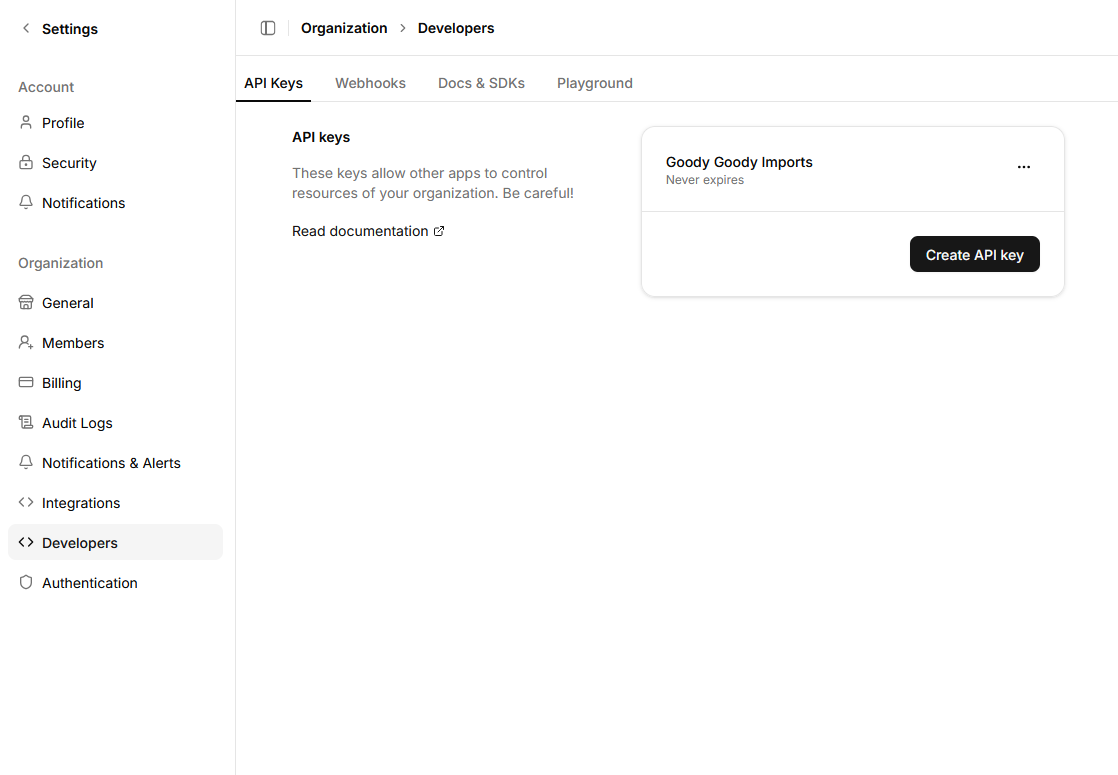
Authentication
Your API key is used to obtain a session token. That session token is then used to make requests to the API:
import axios from "axios";

const res = await axios.post("https://api.retrend.ai/session", null, { headers: { "organization-id":
"YOUR_ORGANIZATION_ID", "api-key": "YOUR_API_KEY", }, });
The response will include a session token, and an expiration time:
{
  "token": "YOUR_SESSION_TOKEN",
  "expires": "2024-12-31T23:59:59Z"
}
After the token expires, you'll need to create a new one.
All subsequent API requests must include the organization ID and session token in the headers:
import axios from "axios";
const res = await axios.get("https://api.retrend.ai/some-endpoint", {
  headers: {
    "organization-id": "YOUR_ORGANIZATION_ID",
    "x-session": "YOUR_SESSION_TOKEN",
  },
});
Next Steps
Now that you understand the dependencies required to use the Retrend API, you can explore the API Reference to learn about all the available endpoints and how to interact with them. One of the first things you might want to do is import your inventory.